Backing Up Your Data on A Dedicated Server : How & Why?
1. Back Up Your Data:
Data loss can happen unexpectedly and affect businesses of any size. Hardware failures, cyberattacks, theft, natural disasters, and human errors can all put critical business data at risk. Even with strong security measures in place, unforeseen issues can still disrupt operations and cause significant losses. That’s why having a reliable data backup and protection strategy is essential to safeguard your business before disaster occurs.
One of the most effective ways to ensure data safety is by using a dedicated server for backups. Dedicated servers offer a high level of security and are specifically designed to store sensitive and critical information. Many dedicated hosting providers offer extra storage and built-in redundancy to safeguard your data against loss. With full control over your backup strategy and reliable performance, dedicated servers are the best choice for businesses looking to protect their digital assets efficiently.
2. What is Data Backup?:
Backing up data ensures business continuity and protects against unexpected data loss.
- Prevents loss from hardware/software failures
- Protects against viruses and cyberattacks
- Offers secure external or cloud storage
- Dedicated servers provide reliable, scalable backup solutions
- Enables quick data recovery during emergencies
How To Backup Your Data on a Dedicated Server?
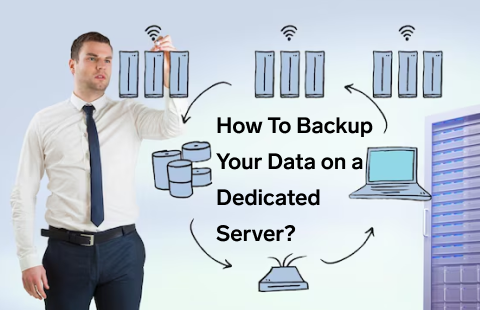
1. Cloud Backup
There are many cloud backup options available today, with services like Google Drive and Dropbox being among the most commonly used. However, these options work better when the amount of data to be backed up is relatively small and the business has a reliable, fast internet connection. For businesses running dedicated servers, the amount of data can be much larger. In such cases, relying only on cloud storage for backups may take more time and may not always be the most practical or convenient solution.
2. Acronis Backup
Acronis provides a reliable and flexible way to back up important data or even an entire system. Its interface is easy to use, so you can manage backups without needing advanced technical knowledge. Acronis also offers storage locations in different regions, allowing you to choose where your backup data is kept. This makes it easier to follow the 3-2-1 backup approach by keeping at least one backup copy in a separate location. The setup is straightforward and provides an additional layer of protection for your data. If you are using an EverData dedicated server, Acronis Backup can also be added as a backup option.
3. cPanel Backup:
cPanel is a control panel for dedicated servers which has an inherent backup alternative. You can essentially backup your data from the cPanel menu, and pick where to store it. This technique is helpful on the off chance that you would prefer not to get a managed server, yet you're searching for a straightforward and simple-to-use backup solution. In the event that you as of now have a dedicated server, and you're utilizing cPanel, this backup technique is an easy decision.
4. RAID Backups
A straightforward technique that can be acquainted with a dedicated server to build the security of the data that you are hosting is RAID 1. This is a hard drive configuration that requires two actual disks, with the thought being that when you store data to one hard drive, it is automatically reflected on the second hard drive so that in the event that one of the pairs fizzles, you can in any case run your server off the drive that is as yet accessible and you will not lose any data. Disappointment of a whole RAID array is an extremely uncommon event which is the reason we suggest this solution for anybody searching for a dedicated server that can offer data integrity.
5. Off-site Backups
The second line of safeguard is important to guarantee that if your server endures data loss, you can in any case recover a copy of your data that would then be able to be used to revamp your dedicated server whenever it is repurchased online. There are various manners by which you can make duplicates of the data that you wish to backup; the data that you are hosting as well as particular records that you ought to back up because these are the most effortless to bundle and transfer automatically. If you somehow managed to take a picture of a whole server and afterward copy this over to a backup site utilizing strategies, for example, SCP or FTP then this could consume most of the day.
6 Application Backup
Many everyday applications used in business operations offer built-in backup features that simplify the process of securing your data. For instance, popular web hosting control panels like cPanel and Plesk allow you to back up your hosting accounts to remote locations with just a few clicks. These tools are especially valuable for web hosting providers, enabling quick account restoration in case of server failure. Dedicated servers enhance this process further by offering key benefits such as improved security, offshore backup options, disaster recovery capabilities, automated backups, easy accessibility, and cost-effectiveness—making them an ideal solution for comprehensive data protection.
Clearly, Linux hosting backs it up for online businesses. If you pick a Linux shared hosting company in India that gives you the best highlights and features, we are sure that you will get the mind-blowing benefits while hosting your websites. With top Linux shared hosting services like Everdata next to you on your side can b a game-changer for your business 24x7. What are you waiting for? Go quest for the best Linux Shared hosting in India and host your business site on Linux!